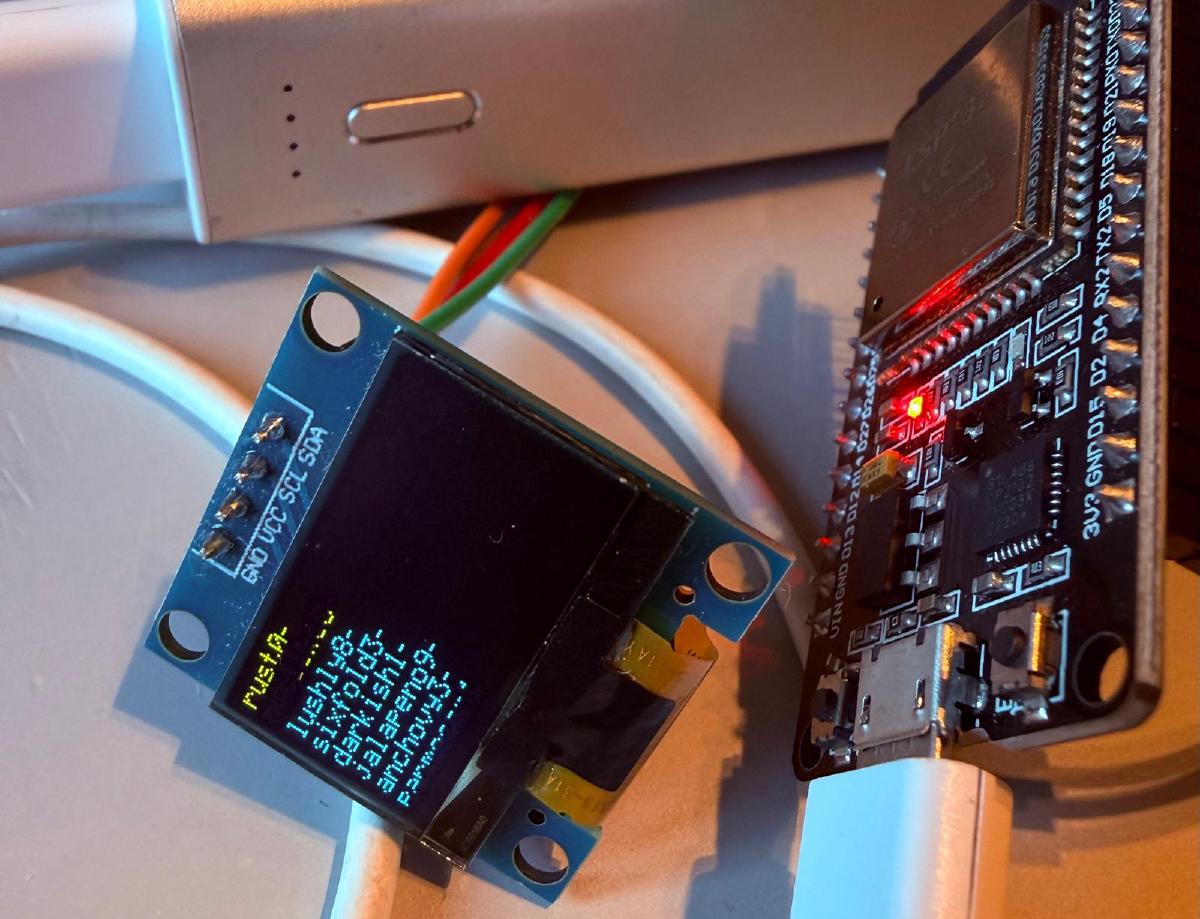
Hourly Vibe is a series of posts where I will go through useful (for me) apps built purely with AI. The goal is to make my life easier by creating tailor-made tools just for my personal use. I also wanted to gain more experience with pure AI coding, mainly with Claude Code, and where it sits at this moment. This article describes an ESP32 hardware passphrase generator named passu.
What is diceware #
Passwords and passphrases are everywhere. Diceware is used to create strong but memorable passphrases, which are also easy to type. Diceware is a manual process where true random numbers are created with six-sided dice. Five rolls give a five-digit number, such as 24315, which picks one word from a wordlist with 7776 words. The wordlist is provided by the EFF.
You can read about the manual process on EFF’s diceware page.
passu is a hardware solution for this manual process.
Problem with computers and randomness #
Computers are deterministic, so software alone can only produce pseudo-random numbers. Operating systems fix this by mixing in noise from the hardware, and their random number generator is fine for passwords. The catch is that you also have to trust everything else running on that computer.
The ESP32 has a hardware random number generator that gives true random numbers while its radio is running. passu uses it to pick words from the EFF wordlist and shows the result on an OLED screen, the serial console, or both. The details are in How it works.
Tools used #
Claude Code did all the programming tasks. I provided the project description and specification, and gave my input when asked and needed.
The whole project took two sessions of about two hours in total. Most of that time went to debugging hardware, not code: bad wires, wrong I2C addresses and a board that wouldn’t flash. More on those in Things that bit me.
Why a dedicated device #
A password manager or a diceware script on a laptop is fine for most things. The point of a separate device is that it stays small and simple:
- Little code. About 1600 lines of C on top of ESP-IDF, which you can read in an evening.
- No network, no storage. The device never joins a network and never writes a passphrase to flash. A passphrase lives in RAM briefly and is then wiped.
- Auditable mapping. The output is built exactly the way you would do it with real dice and the printed EFF large wordlist, so you can check the logic against the paper method.
An ESP32 dev board is cheap, about €5, and the chip has a well-documented hardware random number generator. It also works as an independent unit: the board’s BOOT button is all the user interface it needs. Just understand that you are placing your trust in Espressif’s silicon and their closed Wi-Fi blobs.
By default passu generates a passphrase with 8 groups. Each group is one word (five dice rolls) plus one random digit, for about 130 bits of entropy.
Passphrase length and entropy #
Each word from the EFF list adds about 12.9 bits of entropy. The extra digit adds another 3.3, so one passu group is worth about 16.2 bits. That’s why passu gets the same strength out of fewer groups than plain diceware needs words.
You don’t have to use all eight groups. Think of the output as dice that have already been rolled: each group was picked on its own, so you can stop reading wherever you like. Need five groups? Take the first five and leave the rest. Just don’t pick the ones you like best, because that makes the result less random.
| Length | Words only | passu groups | Note |
|---|---|---|---|
| 4 | ~52 bits | ~65 bits | |
| 5 | ~65 bits | ~81 bits | |
| 6 | ~78 bits | ~97 bits | EFF recommendation |
| 7 | ~90 bits | ~114 bits | |
| 8 | ~103 bits | ~130 bits | passu default |
“Words only” is what you get if you leave the digits out.
How it works #
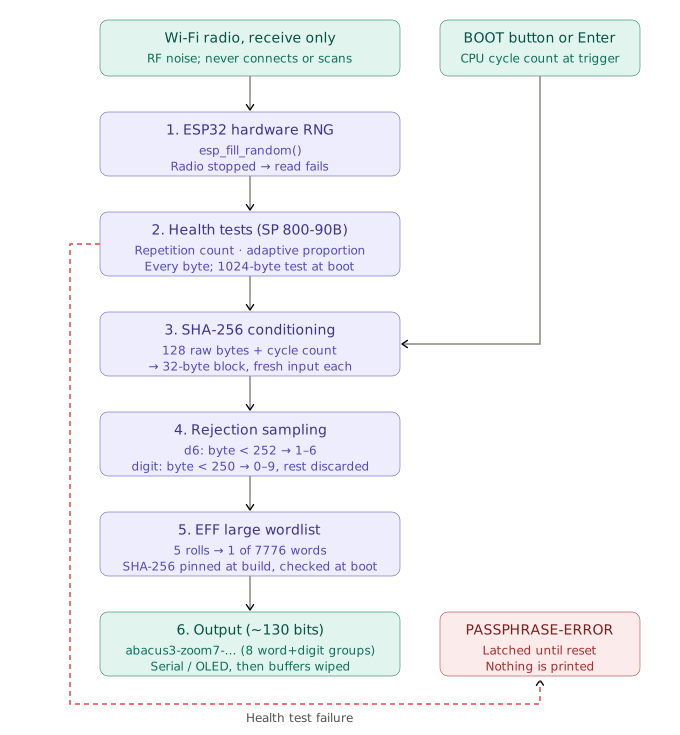
- Hardware RNG. ESP-IDF documents that
esp_fill_random()gives true random numbers only while the RF subsystem is running. So the firmware starts Wi-Fi in station mode and never connects or scans. The radio just listens. If it stops, random reads fail instead of quietly falling back to pseudo-random output. - Health tests. Every byte goes through the repetition count and adaptive proportion tests from NIST SP 800-90B, plus a 1024-byte test at boot. These catch a stuck or badly biased source. They are a tripwire, not proof of entropy.
- SHA-256 conditioning. Each 32-byte output block is the SHA-256 of 128 fresh raw bytes plus the CPU cycle count at the moment of the button press. Nothing carries over between blocks.
- Rejection sampling.
byte % 6would favor some faces because 256 isn’t a multiple of 6. Bytes 252 and up are thrown away for dice rolls, and 250 and up for digits. - EFF wordlist. Five rolls such as
24315pick one of 7776 words. The list is built into the firmware, its SHA-256 is pinned at build time and checked again at boot, along with every line. - Output. The passphrase goes to the serial port, to an optional OLED, or both. Then every buffer is wiped.
If any check fails, the device latches an error and refuses to generate anything until it is reset. No passphrase is better than a bad one.
What you need #
- An ESP32 development board. I tested with a classic ESP32 (ESP32-D0WD-V3);
other variants (S3, C3, …) should work after
idf.py set-target. - A USB data cable. Charge-only cables will not work.
- ESP-IDF v6.1 (5.3 or later should work).
- Python 3 with
pyserialfor the host command. - Optional: a 128x64 or 128x32 I2C OLED (SSD1306, SSD1309 or SH1106).
On Linux your user needs access to the serial port:
sudo usermod -aG dialout $USER # then log out and back in
The source code is on GitHub at jerQ/passu. Clone it first:
git clone https://github.com/jerQ/passu.git
cd passu
Build and flash #
Run everything from the project root. First load the ESP-IDF environment and pick the chip:
source ~/.espressif/tools/activate_idf_v6.1.sh
idf.py set-target esp32
Then build, flash and open the serial monitor:
idf.py build
idf.py -p /dev/ttyUSB0 -b 115200 flash monitor
The build fails if the wordlist doesn’t match its pinned hash, which is exactly what you want. On boot the monitor should show something like this:
passu - ESP32 diceware passphrase generator (proof of concept)
Entropy: radio running, startup health test passed
Press the button on GPIO0 or Enter for a passphrase (8 groups, ~130 bits)
Getting a passphrase #
Pressing BOOT prints a passphrase in the monitor, but the nicer way is the host command. It finds the board by its USB-serial chip, asks for a passphrase and prints only that to stdout:
sudo dnf install python3-pyserial
chmod +x tools/passu.py
ln -s "$PWD/tools/passu.py" ~/.local/bin/passu
| Command | Result |
|---|---|
passu |
One passphrase |
passu -n 3 |
Three passphrases, one per line |
passu -s |
Groups separated by spaces instead of - |
passu --copy |
To the clipboard instead of the terminal |
passu --button |
Wait for a BOOT press instead of asking over serial |
It doesn’t reset the board when it opens the port, and it fails loudly: a health test failure, a crash or no answer within 5 seconds all exit with a non-zero status and no passphrase.
Adding a display #
With a display, passu doesn’t need a computer at all. Just power it with a USB charger, press the button, and read the passphrase off the OLED screen.
The display also fixes the serial port’s one weakness: the computer sees every passphrase. For the ones it must never see, turn serial printing off. The passphrase then only ever exists on the device.
Wiring (default pins):
| Display | ESP32 |
|---|---|
| VCC | 3V3 |
| GND | GND |
| SDA | GPIO21 |
| SCL | GPIO22 |
Enable it in idf.py menuconfig → passu → OLED display, or in
sdkconfig.defaults:
CONFIG_DW_DISPLAY=y
CONFIG_DW_DISPLAY_SH1106=y        # only for SH1106 modules
CONFIG_DW_SERIAL_PASSPHRASE=n     # keep passphrases off the serial port
With serial printing off, the serial port only says that a passphrase was shown
on the display, and the passu command reports that instead of a passphrase.
On a 128x64 screen each group gets its own line, so you can type it straight off the display. It clears itself after 60 seconds, or at once when you press the button.
Things that bit me #
Not everything went smoothly:
- The board wouldn’t flash. esptool gave up with
No serial data received, because my board can’t enter download mode on its own. Holding BOOT while it connects and releasing it once writing starts does the trick. - The display stayed dark. To tell a wiring problem from a wrong address, I made the firmware scan the I2C bus and log every address that answers when the display isn’t found. The culprit turned out to be a loose wire :-)
- The I2C address on the module was “wrong”. Many modules print the 8-bit
address:
0x78on the back means0x3C, and0x7Ameans0x3D.
How Claude Code did #
I think Claude Code did a great job. It carried out the plan without real issues, and all the struggles above were on the hardware side.
What’s next #
passu is a proof of concept. It’s tested, but nobody has reviewed it independently yet. A few things are deliberately left out for now:
- Secure Boot and eFuse lockdown is available as an opt-in profile but not on by default. eFuse burns are permanent, and a mistake bricks the board, so it should be a deliberate step, preferably tried on a spare board first.
- Statistical testing of the raw RNG needs a way to dump lots of raw output, which I don’t want in production firmware. It belongs in a separate test build.
- A crash-loop guard that halts a board that keeps crashing instead of rebooting forever.
Ok, that’s it. Hopefully you got something out of this and I’ll see you in next post.